1
Introduction
5 minutes
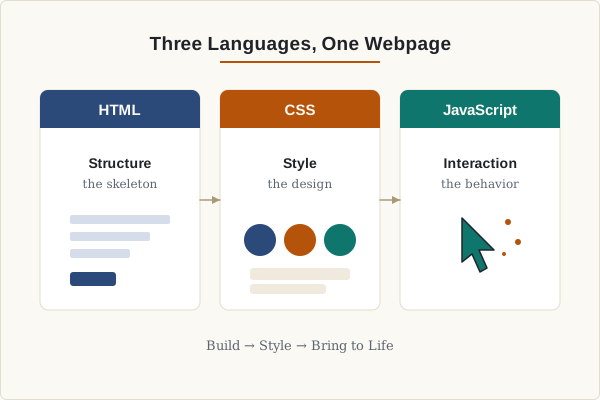
What HTML, CSS and JavaScript do and why we use them together.
TGJ3/4M • Digital Media • ISU Culminating Project
Edit code, run it instantly, and build your first webpage.
A 25–35 minute class plan.
5 minutes
What HTML, CSS and JavaScript do and why we use them together.
10 minutes
Live demo of writing tags, adding styles and a button click.
10–15 minutes
Build your own page in the Code Lab using a template or starter.
5 minutes
Review the three languages, take the quiz, share your page.
HTML is the skeleton: it holds the content of your page.
HTML stands for HyperText Markup Language. We use tags like <h1> or <p> to describe what each piece of content is.
<h1>My First Website</h1>
<p>Hello! This is my first webpage.</p>
<button>Click Me</button>
Preview:
Hello! This is my first webpage.
CSS controls how the page looks: colors, fonts, spacing, layout.
Before CSS
Some text
After CSS
Some text
body {
  font-family: Arial, sans-serif;
  background: #f4f6fb;
  color: #222;
  padding: 24px;
}

button {
  background: #4f46e5;
  color: white;
  padding: 10px 18px;
  border: none;
  border-radius: 8px;
  cursor: pointer;
}

button:hover {
  background: #6d28d9;
}
JavaScript makes the page respond to the user.
const btn = document.querySelector("#myBtn");
btn.addEventListener("click", function () {
  btn.textContent = "You clicked me!";
});This text will change.
const btn = document.querySelector("#demo-change-text");
const text = document.querySelector("#demo-text");
let toggled = false;

btn.addEventListener("click", function () {
  toggled = !toggled;
  text.textContent = toggled
    ? "Nice! You just ran JavaScript."
    : "This text will change.";
});Click to switch this card between light and dark.
const btn = document.querySelector("#demo-theme");
const card = document.querySelector("#demo-theme-card");

btn.addEventListener("click", function () {
  card.classList.toggle("dark");
});Count: 0
let n = 0;
const btn = document.querySelector("#demo-count-btn");
const out = document.querySelector("#demo-count");

btn.addEventListener("click", function () {
  n++;
  out.textContent = n;
});Edit HTML, CSS and JavaScript, then click Run Code to preview live.
Follow these steps. Each step has a small example you can try.
Use <h1> for the biggest title on your page.
Tip: only use one <h1> per page.
Use <p> to introduce yourself.
Tip: keep it short — 1 or 2 sentences.
Use <ul> and <li> for a list.
Tip: 3–5 items looks clean.
Change the background, font and button colors.
Tip: pick 2 colors that look good together.
Use addEventListener to react to a click.
Tip: change textContent to show a message.
Click Run Code and check the preview.
Tip: fix one thing at a time.
Pick a starting point, load it into the Code Lab and make it yours.
Quick reference for the most useful HTML, CSS and JS.
<h1> — main heading<p> — paragraph<img src="..."> — image<a href="..."> — link<button> — clickable button<div> — containercolorbackground-colorfont-sizemarginpaddingborderborder-radiusdisplaytext-aligndocument.querySelector()addEventListener()textContentstyleclassList.add()classList.toggle()5 questions. Get instant feedback.
Build your own personal webpage using HTML, CSS, and JavaScript.
Need a starting point? Pick one of these three starter styles, load it into the Code Lab, and then make it your own.
Warm paper colors, a detailed profile card, quick facts, interests, skills, and a greeting interaction.
Dark dashboard layout with project stats, skill progress, a build plan, and highlightable skill cards.
Bold poster-style sections with metadata, a visual block, feature cards, and rotating fun facts.
Progress: 0 / 8
Builds the skeleton.
Makes it look good.
Makes it interactive.
By the end of this lesson, you can create and preview a simple personal webpage in a browser.